Check your G-code before you cut
G-Code Viewer, Editor & CNC Simulator
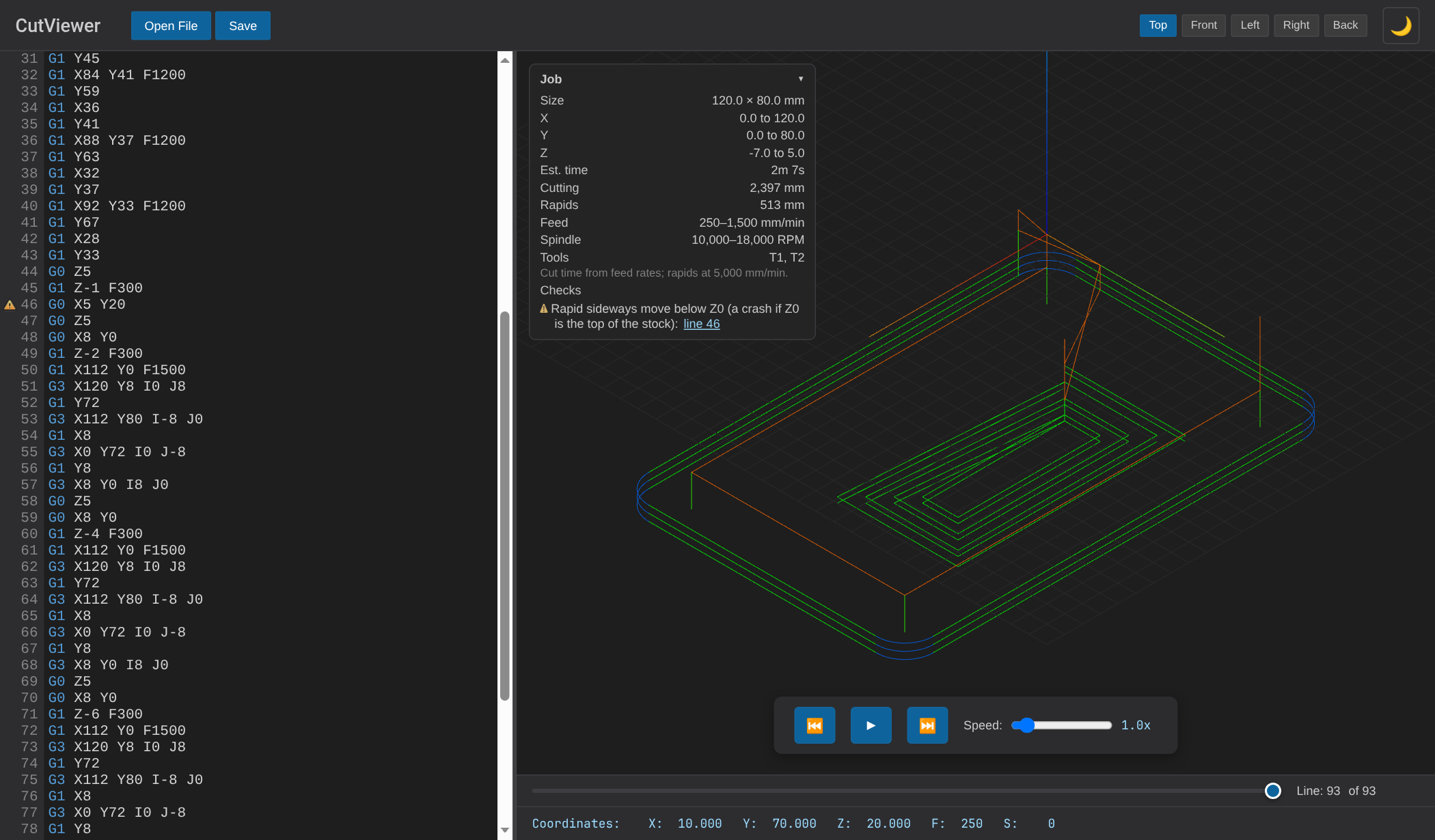
Open a .nc, .gcode or .tap file to see the toolpath in 3D, the estimated run time and part size, and warnings for problems like a missing feed rate or a rapid move below Z0. Free, in your browser, no install.
New: job stats and pre-flight checks. See what changed →
Features
Everything you need for G-code analysis
Pre-flight Checks
Warnings for a missing feed rate, arcs that don't close, cutting with the spindle off, rapids below Z0 and missing units, with links to the lines.
3D Visualization
Real-time 3D toolpaths, even for programs with millions of lines.
Animation
Animate the cutting process so you can see the toolpath in the order it will be cut.
G-Code Editor
Edit G-code with syntax highlighting and watch the toolpath update as you type.
Private by Design
Files are processed in your browser. Nothing is uploaded to a server.
Job Stats
Estimated run time, part size and X/Y/Z extents, cutting distance, feed and spindle ranges, and the tools used.
Free Online G-Code Viewer and NC Viewer
CutViewer is a free, browser-based NC viewer and CNC simulator. Open your .nc, .gcode, .tap, or .ngc files and instantly see a 3D visualization of your toolpaths before running them on your machine.
Whether you're running a hobby CNC, a GRBL-based router, or a full-size mill, CutViewer helps you verify your G-code programs before cutting. Catch errors, check toolpath order, and confirm your feeds and speeds are correct — all without leaving your browser.
Edit G-Code Online
CutViewer includes a full G-code editor with syntax highlighting. Change a coordinate, adjust a feed rate, or delete a section of the program and the 3D toolpath re-renders to match. Click any line to see where the tool is at that point in the program. It's a quick way to check a fix without a round trip through your CAM software.
Supported G-Code Commands
CutViewer supports standard G-code commands including rapid moves (G00), linear interpolation (G01), circular arcs (G02/G03), plane selection (G17/G18/G19), inch and metric units (G20/G21), absolute and incremental positioning (G90/G91), and work coordinate systems (G54-G59). View the full list in our documentation or check the G-code reference guide.
Works with Any CNC Machine
CutViewer reads standard G-code, so it works with virtually any CNC machine — Shapeoko CNC Routers, 3018 Pro, X-Carve, MPCNC, Onefinity, or any machine running GRBL, Mach3, Mach4, LinuxCNC, or other standard G-code controllers.
Free CNC Calculators
Setting up the job, not just checking it? Use the free SFM to RPM calculator, the chipload and feed rate calculator, the ball nose stepover calculator, and the tap drill chart for UNC, UNF and metric threads.
Frequently Asked Questions
What is an NC file?
An NC file (.nc) is a plain-text CNC program written in G-code. It contains the moves, feed rates, spindle speeds and tool changes your CNC machine follows. CAM programs such as Fusion 360, Carbide Create and VCarve export NC files, and other extensions like .tap, .ngc and .gcode hold the same kind of code.
How do I open a .nc file?
Open CutViewer in your browser and drag the .nc file onto the window, or click Open File. The G-code appears in the editor on the left and the 3D toolpath on the right. Because .nc files are plain text, you can also read them in any text editor, but a viewer shows you what the machine will actually do.
Is CutViewer free?
Yes. CutViewer is free to use with no signup, no account and no usage limits.
Are my files uploaded to a server?
No. Files you open are read and rendered entirely in your browser, so your G-code never leaves your computer.
Can I edit G-code in CutViewer?
Yes. CutViewer has a built-in G-code editor with syntax highlighting. Edit the program and the 3D toolpath updates to match.
Can CutViewer handle large G-code files?
Yes. CutViewer is built for big programs with millions of lines. Files over 5MB show a progress bar with a Cancel button while they load.
Ready to simulate your G-code?
No installation required. Works in any modern browser.
Launch CutViewer Now