New in CutViewer: Job Stats, Pre-flight Checks and a Round of Fixes
Seeing a toolpath is useful. Knowing whether a program is safe to run is better. This update adds two features built around that question, plus a long list of fixes that make CutViewer draw real-world G-code more accurately.
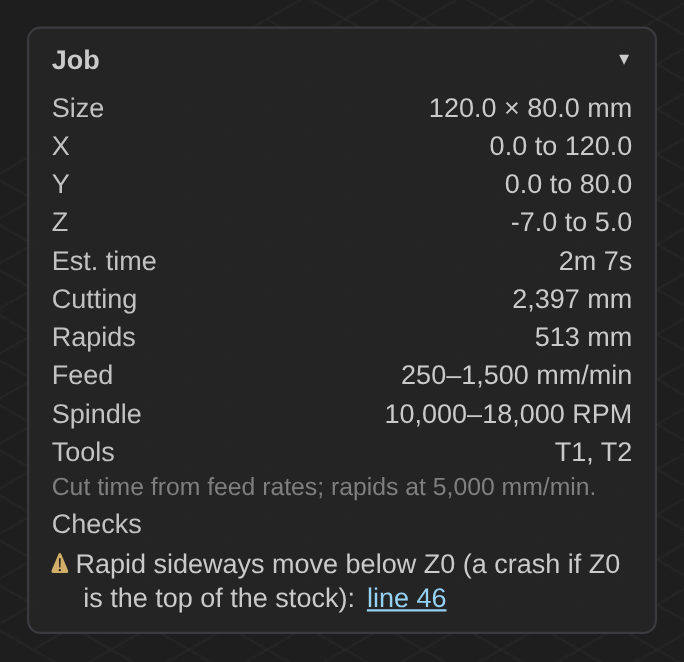
Job stats
Open any file and the new Job panel in the top-left of the 3D view shows:
- Part size and X/Y/Z extents of the cutting moves, so you can check that the job fits your stock and your machine
- Estimated run time, worked out from each move's feed rate (rapids are timed at a typical machine speed, since the real one depends on your machine)
- Cutting and rapid distance, measured along arcs and helixes rather than straight across them
- Feed and spindle ranges and the tools used
Pre-flight checks
The same panel lists problems CutViewer finds in the program, with links that jump to the lines that cause them. Those lines are also marked in the editor. CutViewer checks for:
- A feed move with no feed rate set. Most controllers stop with an error here.
- An arc whose end point isn't on the arc, using the same tolerance GRBL does. These also stop most controllers.
- A cutting move with the spindle off
- A rapid move below Z0. If Z0 is the top of your stock, which is the most common setup, this is a crash.
- No G20/G21 before the first move, which leaves the units up to the controller
We ran the checks over a 4.4-million-line Fusion 360 program with about 70,000 arcs, and they didn't raise a single false alarm.
Smaller additions
- Save your edits. The new Save button (or Ctrl+S) downloads the G-code with your changes, using the original file name.
- Click the toolpath to jump to its line in the editor.
- Drilling cycles are drawn: G81–G89 and G73, with G98/G99 retract heights.
Fixes
A full review of the app turned up bugs that could make a program look different from what your machine will do. Fixed in this update:
- Lines with several codes, like
G0 G90 G54 X10 Y20, now move. Before, only the last code on the line got the coordinates. - Numbers written with a trailing dot, like
X1.(common in Fanuc and Haas output), are read correctly. - Arcs given with
Rare drawn with the right center, including negativeRfor arcs over 180°. - Helical arcs now ramp down in Z, and G18/G19 arcs are drawn in the right plane.
- A feed rate on the same line as a move applies to that move.
- Code after a comment on the same line, like
(T1) G0 X7, is no longer skipped. - Pressing Space during playback pauses instead of typing a space into your file, playback runs at the speed you set, and it stops on the last line instead of jumping back to the start.
- Resizing the window no longer changes the zoom, and clicking a comment line shows the toolpath up to that point.
- A link to a file that can't be loaded now explains what went wrong, and Cancel stops a large file from loading.
How it compares
We also published an honest comparison with NCViewer, including where NCViewer is still the better choice (5-axis, lathe work and offline use).
If something looks wrong in a file you open, or you'd like a check we don't have yet, let us know. Try the new version now.